Today: what is free to spend, and where the rest goes
Monday 21 September
Today
Available to spend
Preliminary$1,180.18
Available
$1,180.18
Bills and subscriptions
$1,810.00
Debt minimums
$230.00
Protected
$2,000.00
From $5,220.18 across your accounts
Needs a look
Car insurance needs a due date.
Coming up
Next 14 days
Visa minimum
$85.00
Internet
$45.00
Salary
+$4,200.00
Personal Finance Companion
One always-current picture of your accounts, income, bills, subscriptions, transactions, debt, and savings, with exactly one useful next move at a time.
One payment. Yours for life.
Only you can see your data. It saves to your account, on every device.
What you end up with
- An Available Money figure, explained line by line, with a bar showing where the rest of your balance goes
- The month you could be debt-free, and the order your debts clear
- One dominant next action at a time
- A real Attention inbox of genuine gaps
- Delivery
- In your account the moment you pay
- Runs on
- Any browser, or installed as its own app
- Renews
- Never. One payment, kept for good
On your devices
It works like an app, without an app store.
Finance runs in your browser, and installs to your phone from there. No App Store, no Play Store, no download, and no update to remember. Add it once and it gets its own icon and its own window, like any other app on your phone.
On iPhone and iPad
Open it in Safari, tap Share, then Add to Home Screen. It opens full screen from then on, with no browser bar.
On Android
Chrome offers to install it, or you can tap Install in the product's own settings. One tap and it is on your home screen.
On computers
It works in any modern browser as it is. Chrome and Edge will also install it as its own desktop window if you would rather it were not a tab.
- All seven areas: accounts, income, bills, subscriptions, transactions, debt, and savings
- The guided Companion, plus direct access to every area for a quick edit
- A real Attention inbox derived from your own records, never fabricated
- "How Draftpace got this" breakdowns on every figure
- A payoff plan for your debts, smallest balance first or highest rate first, with an extra amount you choose
- Bills you can tick paid for the month, and a typical month written out like a budget planner
- Optional account linking for debt and savings, without ever deriving a goal from a linked balance
- Paste-notes, text file, and CSV import with a review step before anything is confirmed
- Shared Responsibility: a per-bill split, a settled date, and a generated statement of what's owed
- A private, real account, not a shared demo
Works in any modern browser · No download required
What this solves
Money information is scattered across bank apps, statements, memory, and habit. Nothing tells you, in one place, what is actually available to spend right now, what is coming due, or what quietly changed. A spreadsheet only knows what you remembered to update.
One Available Money figure in a banner that shows where the rest of your balance goes, with every figure's working one tap away.
Which of these sounds like you?
Maybe not for you if
- You want automatic bank syncing. Everything here is entered by you, on purpose, so nothing reads your real bank credentials.
- You want investment tracking or tax preparation. This is day-to-day money awareness, not a portfolio tool.
- You want the app to tell you how to spend. It shows the picture and the next useful move; the decisions stay yours.
- 1Add what you have across the seven areas: accounts, income, bills, subscriptions, transactions, debt, and savings. Skip anything you do not have yet.
- 2The Companion asks about one area at a time and only continues once it has enough to be useful, never a giant form up front.
- 3Available Money and every other figure recompute live from exactly what you have entered, with a full breakdown behind each one.
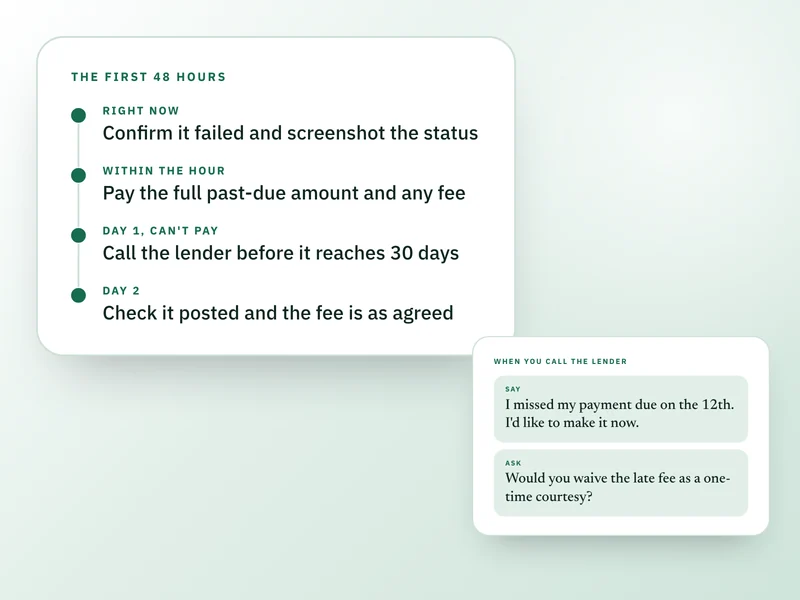
- 4Attention surfaces only real gaps: a bill missing a due date, a balance that has gone stale. Fix the record and the item clears itself.
Show the other 2 stepsShow fewer steps
- 5Mark any bill or subscription shared, say what share of it is yours, and tick it settled when it actually is. A statement you can print says what has and has not been squared up.
- 6Come back anytime. The Companion resumes exactly where you left off; nothing is ever lost between visits.
Worried it becomes another app you stop opening?
It opens on exactly one next action, worked out from what is actually missing or overdue in your own records. There is no list demanding a full review before it will tell you anything.
Does seven areas mean a lot of setup before it is any use?
Nothing is required. Add what you have, skip what you do not, and add the rest later from Settings without starting over. The Companion asks about one area at a time and stops as soon as it has enough to be useful.
Can you trust a number you cannot see the math behind?
Every figure has a "How Draftpace got this" breakdown, line by line, from your own records. Nothing here is a guess dressed up as a number.
Does it connect to my bank?
No. You add the numbers yourself. It never reads your bank account, your card, or your credentials, because there is no connection to read them through.
Is this a one-time purchase or a subscription?
One time. You pay once and keep it, the same as every paid product on Draftpace unless a listing says otherwise.
Does marking a bill shared involve the other person's account?
No. Shared is a flag on your own record, with your share of it as a percentage. The other person never gets a login, and settled is something you tick yourself, never something worked out for you.
Do I need a Draftpace account?
Yes, so your figures save privately and follow you to whatever device you next sign in on.
What happens to my data?
Your financial entries are private to your account. Draftpace does not sell your data or use it for advertising, and never reads your real bank credentials. This is a planning aid, not financial advice.
What's your refund policy?
Personal Finance Companion is a digital product delivered the moment your payment clears, so there are no refunds once access is granted. If something is not working, is not what you understood it to be, or you were charged in error, write to us and we will put it right.
Contact support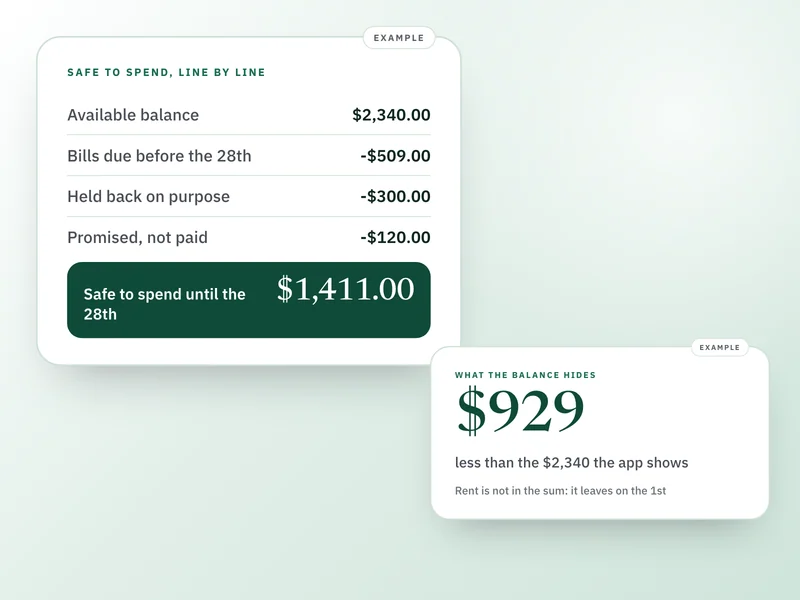
Buy it once. Keep it for good.
No subscription, no renewal, no upsell later. One payment and Personal Finance Companion is yours, on every device you sign in on.
51% off $99. Digital product, no refunds once access is granted.