Now: the one thing, on a card of its own, with one button and two ways to set it down
You said you would come back to this
Call the clinic about the referral
Do this with meADHD Life Companion
Somewhere to put the thing you are carrying, and help getting through it when you are ready. Write it down once, hear about it only when it actually matters, and walk through the hard version of it one question at a time.
One payment. Yours for life.
Only you can see your data. It saves to your account, on every device.
What you end up with
- What deserves your attention right now, or an honest, quiet screen saying nothing does
- A worked-through version of a hard call or email, with the wording left in your hands
- A record of what happened, in your own words, kept as history rather than filed as a task
- A single page per thing you are holding, with everything about it in one place
- Delivery
- In your account the moment you pay
- Runs on
- Any browser, or installed as its own app
- Renews
- Never. One payment, kept for good
On your devices
It works like an app, without an app store.
ADHD Companion runs in your browser, and installs to your phone from there. No App Store, no Play Store, no download, and no update to remember. Add it once and it gets its own icon and its own window, like any other app on your phone.
On iPhone and iPad
Open it in Safari, tap Share, then Add to Home Screen. It opens full screen from then on, with no browser bar.
On Android
Chrome offers to install it, or you can tap Install in the product's own settings. One tap and it is on your home screen.
On computers
It works in any modern browser as it is. Chrome and Edge will also install it as its own desktop window if you would rather it were not a tab.
- Now: what deserves your attention, derived fresh every time from dates and notes you set yourself, never invented
- Life: everything you are holding, in four shapes, never mixed together
- The Companion: eight authored procedures for the situations that are hardest to start
- Direct entry: get help with one thing today, with an offer to remember it afterward
- Real resume: leave a run half finished, come back to the exact question
- A full item page: what it is, what's next, its whole history, and a page to edit by hand
- Suggested opening wording for the hardest conversations, never saved once used
- A private, real account, not a shared demo
Works in any modern browser · No download required
What this solves
Most of what does not get done is not forgotten. It is remembered constantly, in the background, at a volume that makes it hard to think about anything else, and never quite gets a moment where starting it feels possible. A to-do app turns that into a longer list to feel behind on. A calendar wants a time you do not have yet. What actually helps is somewhere to put it down that will bring it back up at the right moment, and something to walk through it with when the moment comes.
A hard call or email with an opening line ready, and a short list of what to have in front of you.
Which of these sounds like you?
Maybe not for you if
- You want it to track a diagnosis, medication, or symptoms. It does not ask about any of them and never will. It is built for how this feels, not for why.
- You want a habit tracker, a streak, or a score. There is no completion percentage anywhere in this product and no comparison between one week and another.
- You want it to remember the details of a bill, an account, or a policy. It records that you need to sort out a problem with the electricity bill, not the provider, the amount, or the account number. Personal Life Affairs Companion and Personal Finance Companion are where that detail belongs.
- You want email reminders, or a nudge about things you never put a date on. It sends no email, and the only notification it can send is one for a date you chose yourself, and only if you switch that on. Everything else it does is stay quiet until something is actually worth mentioning, and say so plainly the moment you open it.
Show 1 more reasonsShow fewer reasons
- 1Write something down, or open the Companion straight away with nothing recorded. Both are first class ways in.
- 2Say what it is, in one line, and pick the shape that fits: something to do, something you are waiting on somebody else for, something ongoing, or a detail you will need again.
- 3Now shows what deserves your attention, derived fresh each time from dates and notes you put there yourself. Nothing is invented, and quiet is a real, honest answer.
- 4When something needs doing, the Companion walks you through it: what it is about, what to have ready, an opening line you can use or replace, short prompts for while it is happening, and one question at the end about how it went.
Show the other 3 stepsShow fewer steps
- 5Close the tab halfway through and come back later. It picks up on the exact question you left, with nothing lost and nothing started twice.
- 6How it went changes what happens next. Sorted closes it. Waiting on someone turns it into that, with a date to check back. Did not get to it changes nothing at all, on purpose.
- 7Life holds everything you have recorded, grouped by what kind of thing it is, with the full history of what happened to it and a page to edit anything by hand.
Tried a to-do list and it just became another list to feel behind on?
That is what most of them do: everything sits on screen at once, sorted by nothing, and the list itself becomes the thing you were trying to get away from. This shows what is worth your attention right now, in one sentence, or says plainly that nothing needs you and stops there.
Do I need an ADHD diagnosis for this to be for me?
No. It is built for the difficulty, not the diagnosis. Brain fog from long covid, a concussion, chronic illness, grief, new parenthood, menopause and depression all make holding a plan in your head unreliable in the same way, and nothing here asks which one applies to you.
Will it guilt me for not finishing something?
There is no streak, no percentage and no attempt counter anywhere in it. If you open something and do not finish it, closing it records nothing at all: not a status, not a note, not a mark against you. Leaving is a button, not a failure.
Does it tell me what to say on a hard phone call?
It gives you an opening line so the first fifteen seconds are not the hardest part, and holds your purpose, the outcome you want and the two things you must not forget on screen while you talk. Past that first sentence it stays out of your way. The words are yours.
Do I have to set the whole thing up before it is any use?
No. Open it with nothing recorded and say what you need to do right now. It helps with that one thing first, and only afterwards, once, asks whether you want it remembered.
Is this a one-time purchase or a subscription?
One time. You pay once and keep it, the same way every paid product on Draftpace works.
Does it send reminders or notifications?
Only if you switch it on, and only for a date you chose yourself. On that day it sends one notification, never during the quiet hours you set, and it says nothing about what it is for on your lock screen unless you allow that. It never sends email, never nudges about something you put no date on, and never counts what is waiting. On an iPhone it needs Alongside added to your home screen first. Switched off, or with no permission given, everything you asked to be raised again waits quietly until you next open it.
Does it store details about my bills, accounts or medical history?
No. It holds what you are trying to get done and what happened, in your own words. Money belongs in a money product and health details in a health one; this one deliberately does not ask.
What happens to my data?
Your records are private to your account. Draftpace does not sell your data or use it for advertising, and nothing here is read by an AI model: there is no model provider anywhere in this product. It holds no diagnosis, no medication, and no symptom, because it is not asked for and never will be. It holds no amount, account number, or provider either, by design: that detail belongs to Personal Life Affairs Companion or Personal Finance Companion, and Alongside only ever records your relationship to getting something done. Suggested wording for a hard conversation stays in your browser and is never saved, even after you use it.
What's your refund policy?
ADHD Life Companion is a digital product delivered the moment your payment clears, so there are no refunds once access is granted. If something is not working, is not what you understood it to be, or you were charged in error, write to us and we will put it right.
Contact support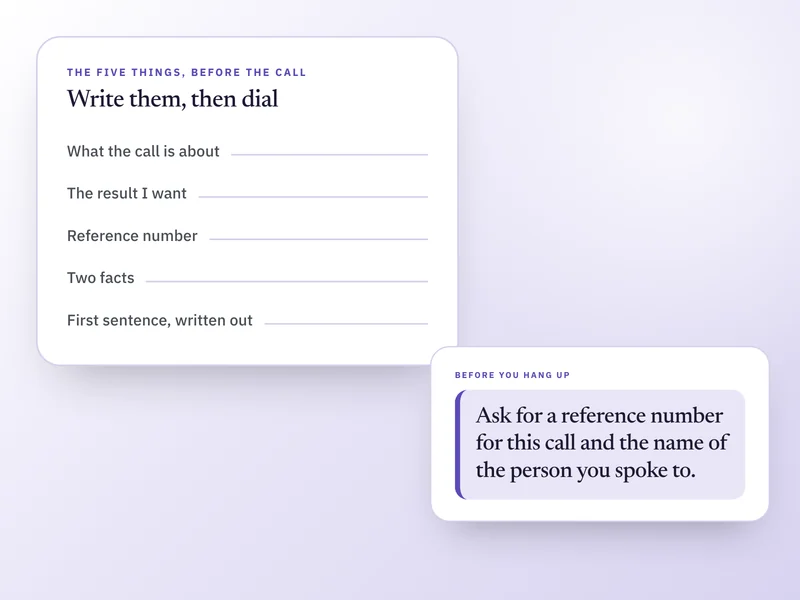
Buy it once. Keep it for good.
No subscription, no renewal, no upsell later. One payment and ADHD Life Companion is yours, on every device you sign in on.
51% off $99. Digital product, no refunds once access is granted.