Free, and not a trial
Know what is actually safe to spend.
See what is safe to spend this month, protect what must be paid, and know the next useful move.
No card. No subscription. Takes a couple of minutes.
- Complete, not a stripped-down preview of a paid product.
- No bank connection, ever. You enter the numbers yourself.
- Your figures save to your account, so they follow you between devices.
What you land on
Safe to spend now
$600.00
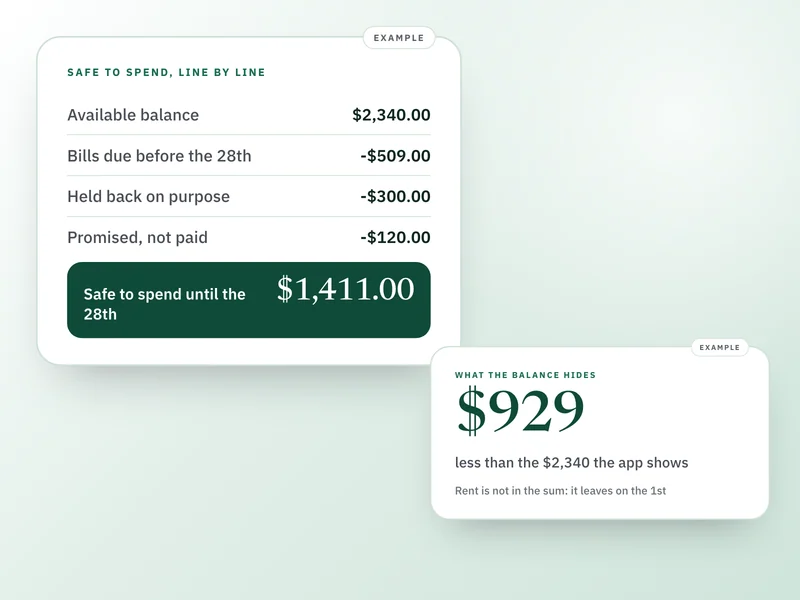
Not your bank's balance. This already holds back the bills and savings you've told it about.
The working
Hide
- Money available right now
- $1,850.00
- +Income received
- $0.00
- -Bill payments made
- $0.00
- -Protected bills not yet paid
- $900.00
- -Reserve still held
- $350.00
Safe to spend
$600.00
Do a weekly check-in
What it takes off your plate.
You don't know what's actually safe to spend without doing the math yourself, every time.
A single Safe-to-Spend figure that updates as the month goes on, no mental math required.
A bill you haven't paid yet still feels like money you have.
Protected bills stay held back whether they're paid or not, so the number never assumes money you actually owe.
Staying on top of it usually turns into a chore, or gets abandoned by month two.
A short weekly check-in keeps the picture accurate, and a quiet way back in if you've been away, no overdue pile-up waiting.
The month looks fine on average and still goes wrong on one particular day.
The tightest day this cycle, named with its date and the amount you'd be down to, worked out from the bill and income dates you already entered.
How it works.
- 1
Add the money available right now, along with any bills you need to protect and anything you'd rather not spend.
- 2
Add income you're still expecting. It only counts toward Safe-to-Spend once you mark it received.
- 3
Use Quick Add as the month goes on to record spending, mark a bill paid, or set money aside.
- 4
Do a short weekly check-in to confirm nothing's missing.
- 5
Close the month when you're ready. Recurring bills and income carry into the next one; everything else starts fresh.
Before you start.
- Worried you'll abandon it like every other budgeting app?
- There is no daily ritual here and nothing to fall behind on. Leave it for a month and your figures are exactly as you left them: you get one short question about what changed, never a wall of overdue tasks.
- Think a template can't fit your situation?
- It asks about your situation and shows only what changes your picture. Anything that wouldn't move the number never appears.
- Afraid it'll judge you for a rough month?
- It is not a budget and there is no score. When you fall behind it asks what changed, not why, and nothing in it compares one month against another.
- Is this actually free, not a trial?
- Free. No payment step, no card, no time limit. It is a complete, narrower tool, not a crippled preview of a paid one.
- Does it connect to my bank?
- No. You add the numbers yourself. Nothing here reads your bank account, your card, or your transactions, and there is no provider it could read them through.
- Do I need an account?
- Yes, a free Draftpace account, so your figures save privately and follow you to whatever device you next open them on.
- Can I use more than one currency?
- Each cycle uses one currency you choose, from a wide list. There is no automatic conversion between currencies, so a cycle never silently mixes two.
On your devices
It works like an app, without an app store.
Monthly Money Reset runs in your browser, and installs to your phone from there. No App Store, no Play Store, no download, and no update to remember. Add it once and it gets its own icon and its own window, like any other app on your phone.
On iPhone and iPad
Open it in Safari, tap Share, then Add to Home Screen. It opens full screen from then on, with no browser bar.
On Android
Chrome offers to install it, or you can tap Install in the product's own settings. One tap and it is on your home screen.
On computers
It works in any modern browser as it is. Chrome and Edge will also install it as its own desktop window if you would rather it were not a tab.
Free installs exactly like paid. It gets its own icon and its own window, the same as every Companion, because being free is not a reason to be less of an app. Your figures are tied to your account rather than the device, so signing in anywhere brings them with you.
When you outgrow it
It handles one cycle at a time, on purpose.
That is the whole design, not a limitation waiting to be lifted. Most people never need more than it. If you find yourself wanting subscriptions, debt and savings held alongside the rest, that is a different product rather than a bigger version of this one, and it is there when you want it.
Start with the number that matters.
Free, complete, and yours to keep. If it is not for you, nothing was spent finding out.