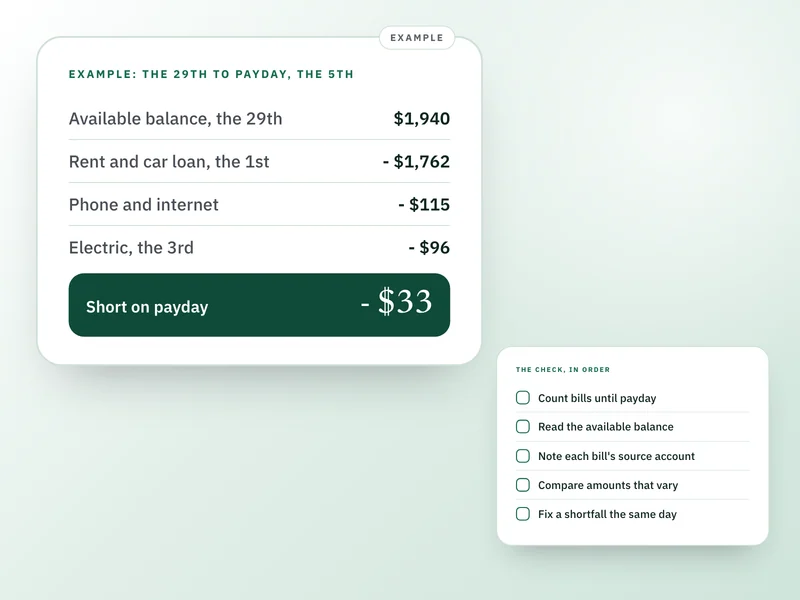
Two days before your busiest autopay date, check four things: what leaves before your next paycheck, which account each bill pulls from, whether any amount has changed, and whether the available balance will cover it all. Two minutes on the 29th is cheaper than a returned payment on the 1st.
This is for US bank accounts and card autopay, where most bills leave through ACH or a card on file. It can't tell you your bank's fees or your lender's late terms, which sit in your own agreements, and it isn't financial or legal advice.
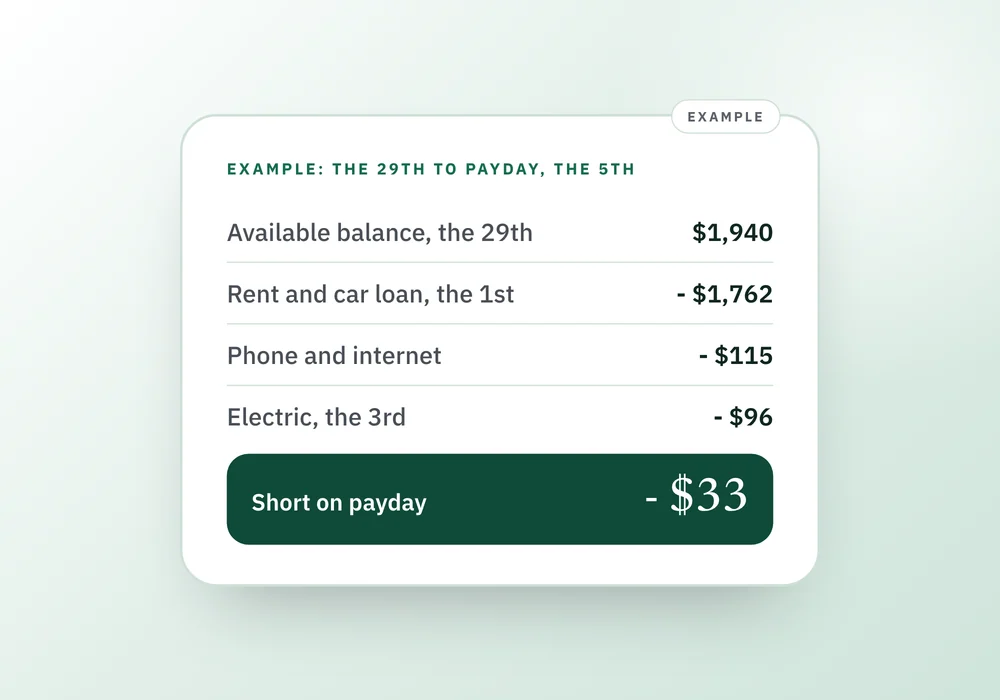
An example: rent day, three days before payday
Say it's the 29th and you're paid on the 5th. Your checking account shows $1,940 available. Most of your bills come out on the 1st, and the electric bill on the 3rd is usually $96. Here's the sum to payday. It's an illustration, so use your own dates and amounts.
Available balance
- Date
- The 29th
- Amount
- $1,940
Rent
- Date
- The 1st
- Amount
- - $1,450
Car loan
- Date
- The 1st
- Amount
- - $312
Phone
- Date
- The 1st
- Amount
- - $55
Internet
- Date
- The 2nd
- Amount
- - $60
Electric, usually $96
- Date
- The 3rd
- Amount
- - $96
Left on payday, the 5th
- Date
- Amount
- - $33
| Line | Date | Amount |
|---|---|---|
| Available balance | The 29th | $1,940 |
| Rent | The 1st | - $1,450 |
| Car loan | The 1st | - $312 |
| Phone | The 1st | - $55 |
| Internet | The 2nd | - $60 |
| Electric, usually $96 | The 3rd | - $96 |
| Left on payday, the 5th | - $33 |
The balance says $1,940 and looks fine for rent. Counted to payday it's $33 short, and it only shows up on the 3rd, when the electric bill leaves. On the 29th you have five days to fix it: move $50 from savings, ask the electric company to shift its date to the 6th, or pay it by hand after payday. Each one takes a couple of minutes now and none of them works on the 3rd.
The check, in order
- Find your next payday, not the next bill. Count every autopay and due date between now and the day the money lands. Include the ones that aren't monthly. A bills list means you don't have to remember them.
- Read the available balance in the account the bills leave from. It can differ from the current balance, and the bank's available figure may not include everything still to post. Which one to trust.
- Check which account each bill pulls from. A card, an old account or a joint one can hold the money while the bill sits on another. Total the bills by account.
- Compare each amount that varies with last month's. Electric, water, and card autopay set to a statement balance are the usual ones. Budgeting for variable bills shows how to set a planning figure to compare with.
- Subtract. If the result is negative, fix it that day: move money, move a date, or call the biller.
- Pick one date each month, two or three days before the busiest one, and put it in your calendar.
What to say to the biller
Use the number on your statement. Most billers can move a due date once a month or so, and some can't, so ask.
Pick the one you are facing
“I get paid on the 5th. Can you move my due date from the 3rd to the 6th, and does the autopay follow it?”
“My autopay went from $96 to $148. Can you tell me what changed on this bill?”
“I'd like the autopay on the 3rd paused so I can pay by hand after the 5th. Will that trigger a late fee?”
Changed amounts should not surprise you
Under the federal rule for preauthorized transfers, when a debit will differ from the last one, the company must send written notice of the amount and date at least 10 days before, unless you've agreed to be told only when it falls outside a range you set. That means a notice or email is worth reading. If you opted for the range, an amount inside it arrives with no warning at all.
If you need to stop an autopay
Tell your bank at least three business days before the scheduled date, orally or in writing. The bank may ask you to confirm in writing, and an oral request can lapse after 14 days if you don't. Banks often charge a fee for a stop payment order.
The CFPB advises telling the company to revoke your authorization as well, and it points out that stopping the payment doesn't cancel what you owe: on a loan you still have to pay it another way. If it's a subscription you want gone, how to cancel one that's hard to cancel covers that.
When the check isn't enough
- The balance is fine and the payment still fails. A new card number, a closed account or an expired card on file can break an autopay. When you replace a card or account, re-check every bill that used it.
- The payment bounces. A bank can return it unpaid or cover it and charge an overdraft fee, depending on the account. Either way, the first 48 hours after a missed payment are the ones to use.
- Card autopay is set to the minimum. It keeps the account current and leaves the rest owing. Look at which amount your autopay pays.
- Your payday moves. A holiday or a weekend can shift the deposit by a day or two. Count on the day the money has actually landed before, not the day it's due.
Questions people ask
How do I see every autopay coming out of my account?
Look at the last three months of statements for repeat charges, and check the scheduled payments or recurring transfers page in your bank's app. Then open each card statement for subscriptions charged there. Anything that appears in all three months belongs on your bills list, and anything that appears once a year belongs on it too.
What happens if I don't have enough money for an autopay?
Depending on your bank and account, the payment can be returned unpaid or the bank can pay it and charge an overdraft fee. The biller may add a late fee as well. What applies to you is in your account agreement and your bill terms. If it already happened, act within a few days.
Can I change my autopay date?
Often, yes. Many billers let you move a due date, and some let you pick a date in the account settings. Ask for one just after payday. Not every biller allows it, and a loan or a lease can be fixed, so check that a change won't cause a late fee before you rely on it.
How do I stop an automatic payment?
Tell the company to revoke your authorization and tell your bank, and ask the bank about a stop payment order. The bank must get the request at least three business days before the payment date. Stopping the payment doesn't cancel the debt, so arrange another way to pay whatever you owe.
Should I put every bill on autopay?
We'd autopay the fixed ones, and keep variable ones on alerts so the amount gets a look before it leaves. For cards, autopay of at least the minimum is a safety net. It works only when the account it pulls from has the money, which is what the check above is for.
Where the Companions fit
Monthly Money Reset is free and is built for this check. You enter the money you have now, your income and its expected date, and your bills with due dates, and it holds back the bills you've marked protected from the safe-to-spend figure. Its Tightest day chip projects your balance day by day to the end of the month using only dated bills and income, and it names the lowest day and the amount you'd be down to. It works to the end of the month rather than to your payday, and it only knows what you type in, since it doesn't connect to your bank.
Personal Finance Companion keeps bills and subscriptions with their due dates and shows what's due in the next 14 days, including pay days. Its Available Money is a month-level estimate that counts a full month of bills whether or not they've been paid, so use the sum in this guide for the days before payday.
Sources and how we checked
- 12 CFR 1005.10, Preauthorized transfers (CFPB, Regulation E): Stop payment at least three business days before the transfer, oral request may lapse after 14 days without written confirmation, and notice at least 10 days before a transfer that varies in amount unless you chose a range.Checked 26 September 2026.
- How do I stop automatic payments from my bank account? (Ask CFPB): Revoke authorization with the company and tell your bank; stop payment orders usually cost a fee; stopping a payment on a loan does not cancel the debt.Checked 26 September 2026.
- NSF fees and overdraft protection (HelpWithMyBank.gov, OCC): An available balance may not reflect transactions processed overnight, so a payment can overdraw an account that looked positive.Checked 26 September 2026.
Where to go next
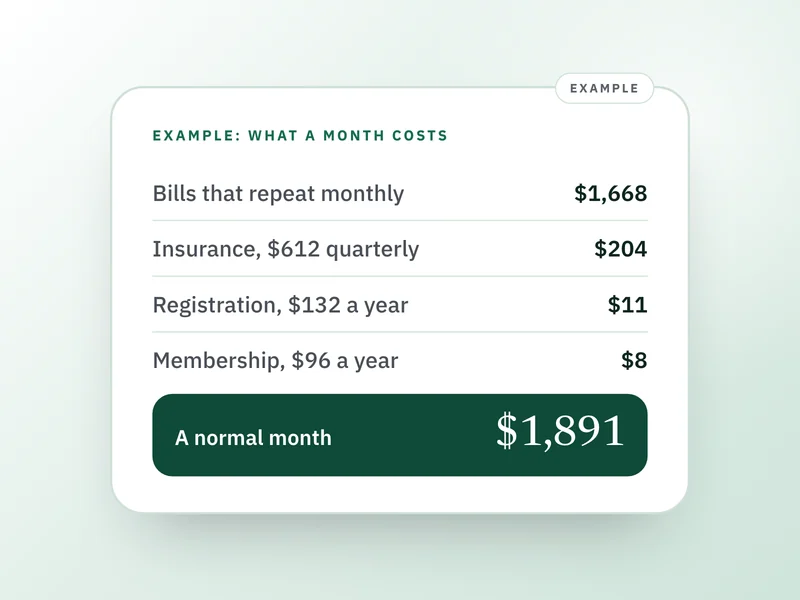 If this is where you areMonthly bills list: include the bills that are not monthlyBuild the full list of what leaves your account, including the bills that are not monthly.
- You missed a payment. What to do in the next 48 hours
When a payment has already failed, this covers what to do in the first 48 hours.
- How much money is safe to spend after your bills?
Take the bills due before payday off your balance to see what is really yours to spend.
- How to budget for bills that change every month
For bills that change amount every month, this sets a planning figure so the check has a number to compare with.