Due: the vehicle as its cluster, and the one job that needs you
Across everything you own
Due
as of 1 Aug
Oil and filter change
500 miles past due, 42 days past due (every 5,000 miles, every 6 months)
I had this doneAlso due
Tire rotation
1 day past due, 600 miles left
Cabin air filter
3,600 miles left, 14 days left
Paperwork
Vehicle Maintenance Companion
The intervals you actually know, kept against the vehicles you actually own, so you always know what's due and can put it in writing before a shop touches your car.
One payment. Yours for life.
Only you can see your data. It saves to your account, on every device.
What you end up with
- One ranked list of what is due or due soon, across every vehicle you own
- A clear, separate list of items with nothing to judge yet, never guessed
- A dated, mileage-stamped Service Boundary document, ready to hand to a shop
- A service record by vehicle and by year, which you can print for a buyer
- Delivery
- In your account the moment you pay
- Runs on
- Any browser, or installed as its own app
- Renews
- Never. One payment, kept for good
On your devices
It works like an app, without an app store.
Vehicles runs in your browser, and installs to your phone from there. No App Store, no Play Store, no download, and no update to remember. Add it once and it gets its own icon and its own window, like any other app on your phone.
On iPhone and iPad
Open it in Safari, tap Share, then Add to Home Screen. It opens full screen from then on, with no browser bar.
On Android
Chrome offers to install it, or you can tap Install in the product's own settings. One tap and it is on your home screen.
On computers
It works in any modern browser as it is. Chrome and Edge will also install it as its own desktop window if you would rather it were not a tab.
- Due: one ranked view of what needs attention across every vehicle you own, computed fresh
- Vehicles: as many as you own, each with its own items, plate and service-history status
- Usual jobs for a vehicle in one tap, chosen from fuel type, age, mileage and use
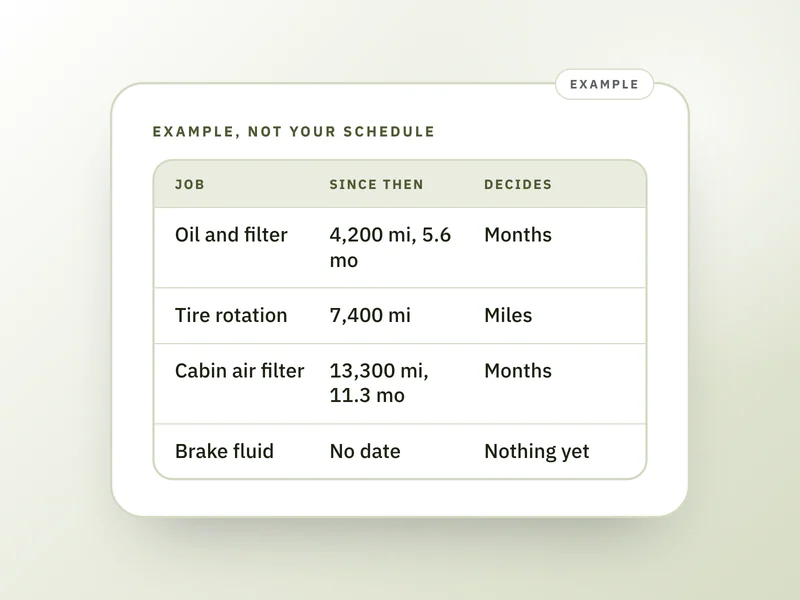
- A short, hand-written list of typical starting intervals, always labelled typical, always editable
- A one-time severe-duty toggle per maintenance item, not per vehicle, changeable any time
- History: every service kept with its day, mileage, shop, cost and note, by year
- Paperwork: registration, insurance, inspection and warranty dates, plus a glove box card
- Starter lists you can add in one go: before winter, before a long drive, once a year
- Opt-in reminders for a job that reached its interval or a date that's close
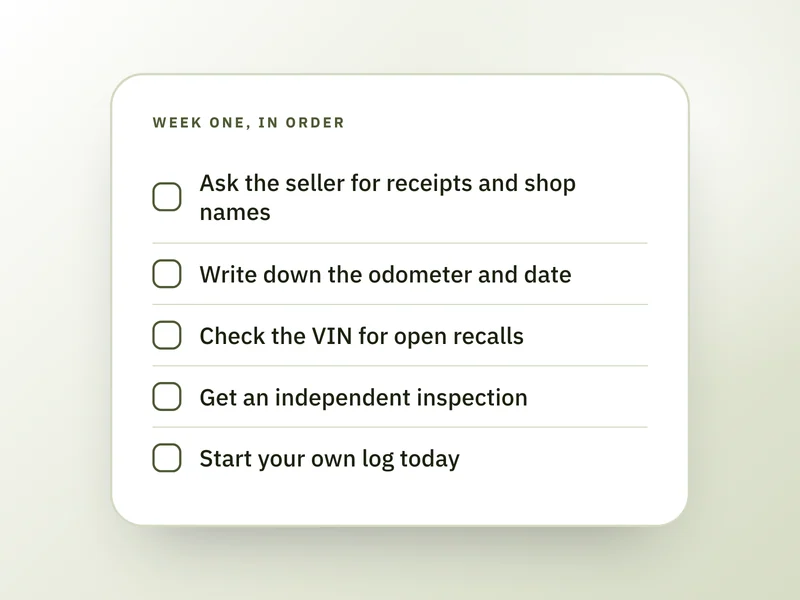
- A distinct unknown-history path for a used or inherited vehicle
- The Service Boundary: a dated, mileage-stamped printable of what's requested and what's authorized
- A printable service record for a buyer, and a one-page glove box card
- A private, real account, not a shared demo
Works in any modern browser · No download required
What this solves
A car's real maintenance history lives across a glovebox folder, a dealer's own system you cannot access, and whatever a mechanic told you two years ago. Nobody remembers the exact interval they were quoted, so every visit starts from zero, and "while we had it up on the lift" is how a routine oil change becomes a much larger bill. A generic manufacturer schedule you found online is not what anyone actually agreed to for this vehicle, this driving, this history.
A place to type it in once, and keep it, editable, against that vehicle for good.
Which of these sounds like you?
Maybe not for you if
- You want it to look up your vehicle's real factory schedule for you. It has no connection to any manufacturer's data and never will; every interval it stores is one you entered or copied from a short, clearly-labelled list of typical starting points.
- You want it to book a shop, order parts, or contact anyone on your behalf. It does none of that.
- You want it to read your car's odometer or connect to the vehicle itself. There is no such connection anywhere in this product. You tell it your mileage.
- You want it to store or scan your documents. It records a date and where the paper is kept, and nothing is uploaded.
- You want fuel logging or a running cost analysis. It keeps the cost of each service if you enter one, and adds up only those.
Show 2 more reasonsShow fewer reasons
- 1Add a vehicle: what you call it and what it runs on. That is all it needs. Add as many as you own; a strip of plates on Due shows which one needs you, and one tap narrows the view to it.
- 2Get its usual jobs in one tap. Its fuel type, its age and its mileage choose a short list of typical jobs to start from, or you can type them in from your own manual.
- 3Track a maintenance item on it: start from a short list of typical jobs and intervals, or write your own from scratch. Every interval is yours to change, before or after saving.
- 4Turn on severe duty for a specific job if hard use shortens it. It halves that job's own interval; nothing else changes.
Show the other 6 stepsShow fewer steps
- 5If you know the vehicle's history, record when a job was last done, by date, mileage, or both. If you do not, that job waits, honestly, until you have a real fact.
- 6Due shows one ranked view of what needs attention across every vehicle, most urgent first, and says plainly when nothing does.
- 7Say a job was done with the real day and mileage, and who did it and what it cost if you want. Its due date resets from that fact, the vehicle's mileage moves up with it, and the service is kept in History.
- 8Add the dates that belong to the vehicle, such as registration, insurance, an inspection or a warranty ending, and where the paper is kept. They show on Due as they get close.
- 9Switch reminders on in Settings if you want one. Off by default, and only for a job that reached its interval or a date you recorded.
- 10Before a shop visit, generate a Service Boundary: choose what you are requesting today, add anything else you are asking for, set the most you will agree to without a call, and everything else prints as not authorized. Printing a service record for a buyer, or a glove box card, works the same way.
Does it know my car's real factory maintenance schedule?
No, and it is not trying to. What it offers is a short, hand-written list of typical starting intervals for common jobs, always labelled typical, and copying one onto your vehicle makes it an ordinary editable number from that point on. Your own manual or your own mechanic is always the real source. This just means you are not typing a number from nothing.
I bought a used car with no service records. What happens?
You mark that vehicle's history unknown when you add it, and it stops asking for a last-done date it does not honestly have. Every item on it reads as nothing to judge yet until you record a real fact, and it never guesses that something is already overdue on a car it knows nothing about.
I tow, or drive short trips. What does severe duty actually change?
It is a one-time toggle on a specific job, not on the whole vehicle, because an oil change and a tire rotation do not shorten at the same rate. Turning it on halves whichever interval you entered for that one job. It never substitutes a hardcoded number of its own and never touches anything else on the car.
What is the Service Boundary, and what is it for?
A dated, mileage-stamped document you generate before a shop visit: exactly what you are requesting today, with everything else you track on that vehicle listed as not authorized without a further conversation. It states your own choice, decided before you hand the keys over, not a recommendation from Draftpace about what your car needs.
Does it connect to my car or read my odometer?
No. There is no connection to any vehicle, dealer, or manufacturer system anywhere in this product, and no VIN lookup. You enter your own mileage, which is also why nothing here can be wrong about your car without you having typed it.
Will it nag me with manufactured urgency?
There is one main screen: what is due, ranked, across every vehicle you own. No streak, no score, and on a day when nothing is due it says exactly that and stops.
Does it send me a reminder when something comes due?
Only if you switch it on, in Settings. It is off by default. When it is on you get one notification at most once an hour, only for a job that reached the interval you set or a date you recorded that is close, and each thing only once. Quiet hours are yours to set, and what is due is always worked out fresh when you open it.
Will it keep my service history for when I sell the car?
It keeps every service you record, with the day, the mileage, who did it and what it cost if you entered one, and prints them oldest first as a service record. The page says it is your own record, not a dealer or shop history, because that is what it is.
Is this a one-time purchase, and do I need an account?
One time, and yes. The account is what keeps your vehicles private and there on your phone at the shop after you set them up on a laptop.
What happens to my data?
Your vehicles and maintenance records are private to your account. Draftpace does not sell your data or use it for advertising, and nothing here is read by an AI model: there is no model provider anywhere in this product. It has no connection to any vehicle, dealer, or manufacturer system, and cannot look up or share anything about your car beyond what you typed in yourself.
What's your refund policy?
Vehicle Maintenance Companion is a digital product delivered the moment your payment clears, so there are no refunds once access is granted. If something is not working, is not what you understood it to be, or you were charged in error, write to us and we will put it right.
Contact support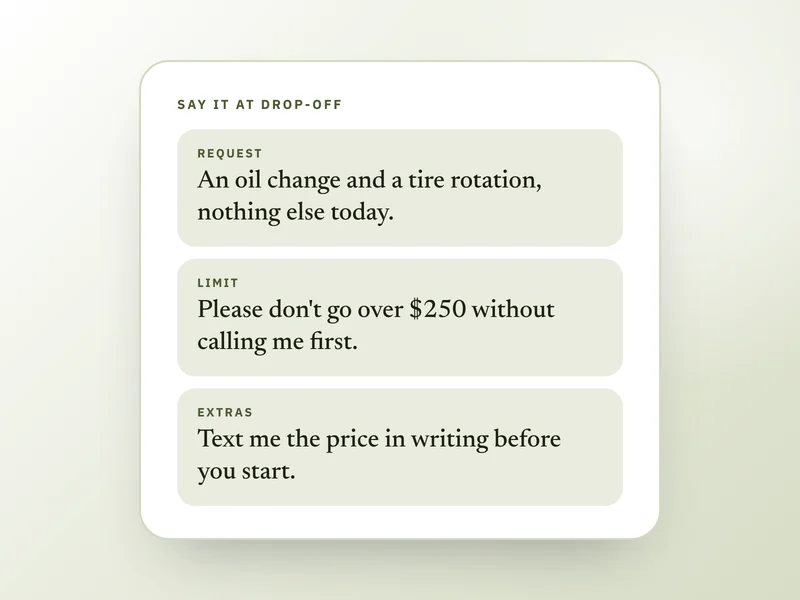
Buy it once. Keep it for good.
No subscription, no renewal, no upsell later. One payment and Vehicle Maintenance Companion is yours, on every device you sign in on.
51% off $69. Digital product, no refunds once access is granted.