Home: one sentence about how your home is doing, then the bands
Your home
A few things need a look
Something’s wrong
Needs a look
Washing machine pipe is leaking
Reported as a problem
Worth taking care of
Flush the tank
Last done 2 years ago, usually every year
Shut off and drain before the freeze
Not logged yet, usually October
Home Base
Home Base remembers your home so you do not have to. It knows what needs doing and when, and it stays quiet the rest of the time.
One payment. Yours for life.
Only you can see your data. It saves to your account, on every device.
What you end up with
- A sentence about your home's condition, and the few things worth doing
- Care and seasonal work raised when it is due, never a permanent list
- A history of what has been done, by whom, and what it cost
- A printable survey of your home you can fill in by hand
- Delivery
- In your account the moment you pay
- Runs on
- Any browser, or installed as its own app
- Renews
- Never. One payment, kept for good
On your devices
It works like an app, without an app store.
Home Base runs in your browser, and installs to your phone from there. No App Store, no Play Store, no download, and no update to remember. Add it once and it gets its own icon and its own window, like any other app on your phone.
On iPhone and iPad
Open it in Safari, tap Share, then Add to Home Screen. It opens full screen from then on, with no browser bar.
On Android
Chrome offers to install it, or you can tap Install in the product's own settings. One tap and it is on your home screen.
On computers
It works in any modern browser as it is. Chrome and Edge will also install it as its own desktop window if you would rather it were not a tab.
- The twelve areas of a home, from kitchen and laundry to structure and renting
- A hand-built care schedule covering 122 kinds of thing, including seasonal jobs
- The Home Survey: a printable book for gathering what you own away from a screen
- A what-to-buy line on each thing, plus a printable Item Card for the shop
- Provider suggestions drawn from your own history: who you last used for that category, never a directory
- Setup by tapping rather than typing, plus paste-in import from your own notes
- Somewhere to record what's currently wrong, kept separate from what's merely due
- Service history and costs kept against the people who did the work
- Reminders that reach you before something becomes expensive
- A private, real account, not a shared demo
Works in any modern browser · No download required
What this solves
The filter size is on the filter, the model number is behind the fridge, and the last time anyone flushed the water heater is nowhere at all. Homes do not fail because people are careless. They fail because nobody could reasonably hold three hundred small facts and dates in their head, and the reminder to act arrives as a leak in the ceiling.
One page that answers whether anything needs you this week, in a sentence, instead of a dashboard to interpret.
Which of these sounds like you?
Maybe not for you if
- You want to photograph model numbers and warranty cards and have them read automatically. Everything here is entered by you, on purpose. There is no camera scan, no document upload, and no AI reading your paperwork.
- You want a full room-by-room inventory valued for insurance. This tracks what needs upkeep, not everything you own.
- You want to share the list with a partner or a housemate and assign jobs between you. Home Base is single-account for now.
- You manage more than one property.
Show 1 more reasonsShow fewer reasons
- 1Tell it whether you own or rent, then tap what your home has. Twelve areas, from the kitchen and the boiler to the garden, damp and pests, and the papers.
- 2It suggests the care each one usually needs and you untick anything that does not apply. Nothing is created without you confirming it.
- 3Already have notes somewhere? Paste them in and it will pull out what it recognises for you to confirm, line by line.
- 4Home shows what needs you now, what is coming up, and what has recently been handled. When there is nothing, it says so.
Show the other 3 stepsShow fewer steps
- 5When something is worth doing you can act on it or push it back. Acting records what actually happened: who did it, what it cost, and anything worth remembering next time.
- 6Something broken rather than due? Say what is wrong in a sentence and it works out what you mean and treats it as its own kind of problem. If you have already used somebody for that kind of work, it says who.
- 7Print an Item Card for anything you are about to buy a part for. It carries the make, the model and the what-to-buy line, so the paper is enough on its own at the counter.
Worried it becomes another app nagging you with a list?
It shows the few things worth your attention, in a sentence, and when nothing needs you it says your home is in good shape and stops there. What appears is ranked by what it would cost you to leave it, so a smoke alarm outranks a dusty vent, and every row states the fact that put it there.
Is setting this up an evening you do not have?
Setup is tapping what you have from a list, not typing, and you can stop at any point. It works from whatever you have given it: one water heater with a date on it is already worth more than forty blank rows. There is a printable book for gathering model numbers round the house away from a screen.
How can it know how often anything is really due?
Because somebody wrote it down: a hand-built list of 122 kinds of thing found in homes and the care each one needs, including which jobs belong to which month. Nothing is inferred by a model, and every date traces back to something you entered.
Already behind on everything and expecting to be told so?
It never says overdue and never keeps score. A job not done yet is described by when it was last done and how often it comes round, and you can push anything back without it counting against you.
Does it scan receipts or warranty cards?
No. You add the details yourself, on purpose. There is no camera scan, no document upload, and nothing here is read by an AI model.
Is this useful if I rent?
Yes, and it adjusts. Say you rent and it stops asking about the roof and the gutters and starts asking about what costs a renter money: the notice deadline, the deposit, and what you reported to the landlord and when.
Can I share it with a partner, or track a second property?
Not yet, on both. It is built around one account and one home for now, with no sharing or assigning between people.
Is this a one-time purchase, and do I need an account?
One time, and yes. You pay once and keep it, and a Draftpace account is what keeps your home records private and available on whatever device you next open.
What happens to my data?
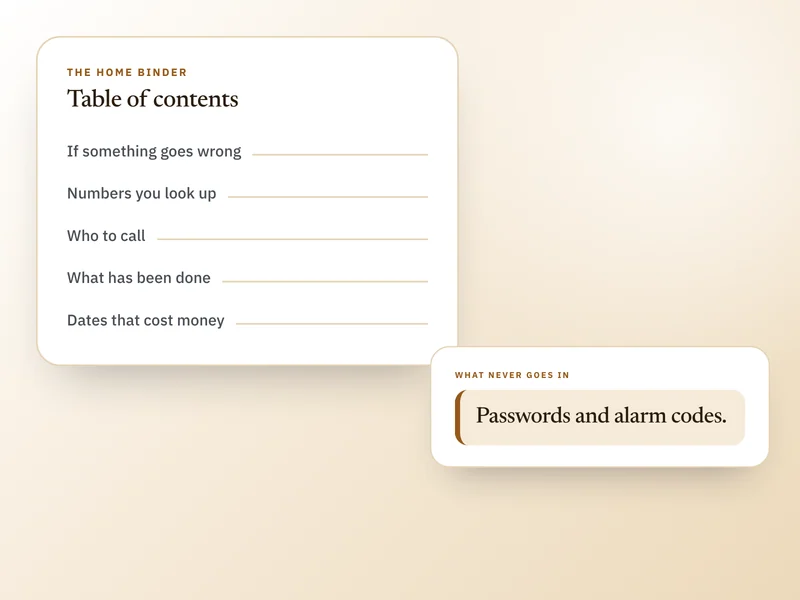
Your home records are private to your account. Draftpace does not sell your data or use it for advertising, and nothing here is read by an AI model. Home Base is a tracking aid, not a substitute for your manuals or a professional inspection, and anything involving gas, electricity, structure or water is a job for somebody qualified. Deliberately, it is not a place to keep passwords or alarm codes.
What's your refund policy?
Home Base is a digital product delivered the moment your payment clears, so there are no refunds once access is granted. If something is not working, is not what you understood it to be, or you were charged in error, write to us and we will put it right.
Contact support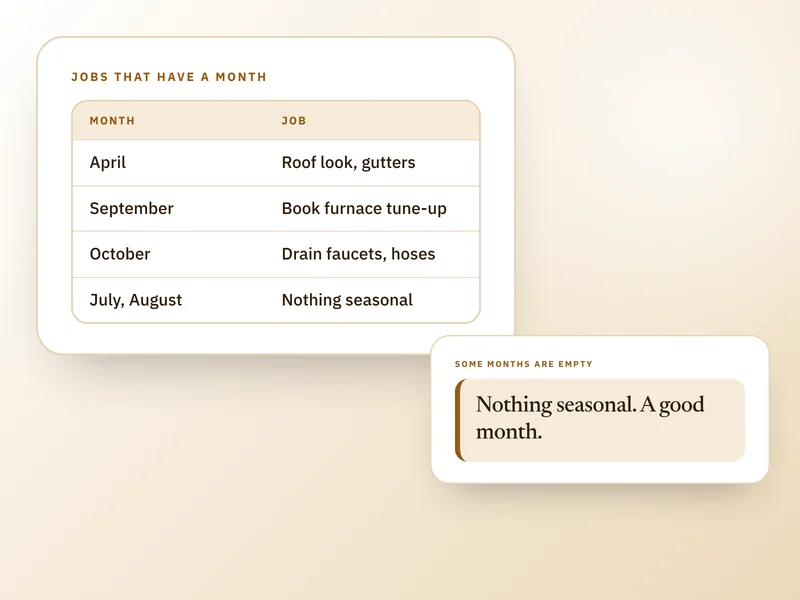
Buy it once. Keep it for good.
No subscription, no renewal, no upsell later. One payment and Home Base is yours, on every device you sign in on.
51% off $99. Digital product, no refunds once access is granted.