Today: the trip as a day line, including what you are waiting on
JAPAN
Today
Currently in Kyoto
Shinkansen to Osaka
Kyoto Station
Lunch at Nishiki Market
Awaiting confirmation
Kyoto Ryokan
Check-in begins
Tomorrow
Rental car
Pickup begins
Waiting
Travel Companion
Everything your trip depends on, in one place, and the one thing most travel tools miss: what else moves when one thing moves. Record a change to a flight and it shows you the transfer, the check-in and the reservation that were built on it, one at a time.
One payment. Yours for life.
Only you can see your data. It saves to your account, on every device.
What you end up with
- Today's state of the trip, in plain sentences that each trace to something you recorded
- What else is affected when one thing changes, listed and never auto-edited
- A worked-through version of a hard call with an airline, hotel or transport company
- A dated record of what happened, and lessons carried forward to the next trip
- Delivery
- In your account the moment you pay
- Runs on
- Any browser, or installed as its own app
- Renews
- Never. One payment, kept for good
On your devices
It works like an app, without an app store.
Travel runs in your browser, and installs to your phone from there. No App Store, no Play Store, no download, and no update to remember. Add it once and it gets its own icon and its own window, like any other app on your phone.
On iPhone and iPad
Open it in Safari, tap Share, then Add to Home Screen. It opens full screen from then on, with no browser bar.
On Android
Chrome offers to install it, or you can tap Install in the product's own settings. One tap and it is on your home screen.
On computers
It works in any modern browser as it is. Chrome and Edge will also install it as its own desktop window if you would rather it were not a tab.
- Today: the current operational state of the trip, derived fresh, never a manual task list
- Itinerary: the whole trip laid out day by day, a day with nothing on it said plainly, printable
- Packing lists: starter lists by trip type, added per traveller only when you choose, yours to tick or remove
- Trip: destinations, bookings, documents and preparation, with a Trip Brief summarising it all at a glance
- Booking connections: say once what a booking depends on, the product remembers the shape of your trip
- The change-impact walk: record a change and see exactly what was built on top of it
- The Companion: nine authored situations for when something goes wrong, flight to lost or stolen
- Open threads: anything you're waiting to hear back on, surfaced while it matters
- Real timezones per place, from an offline lookup, so a date line is never wrongly called
- People: who is travelling, their requirements, and the documents that belong to them
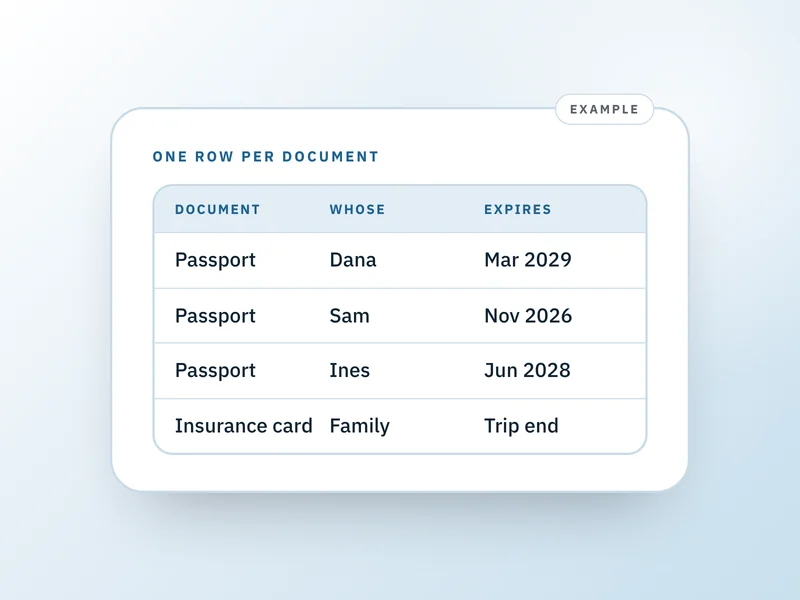
- A document registry: what exists and where it's kept, never a file, never an upload
- Record: what happened, dated, and what's worth knowing next time you go
- My Trip Book: a blank, structured, printable planner covering every part of the trip
- Travel history: a trip you mark done stays readable and printable, never deleted
- Memories: a note and a link you can save on a trip once it's done
- A populated trip record: printed with your actual travellers, bookings, documents and dated log once a trip is finished, not a blank form
- A private, real account, not a shared demo
Works in any modern browser · No download required
What this solves
A trip is easy to plan and hard to run. The planning happens once, weeks ahead, with time to think. The running happens in an airport at 6am when the flight has moved three hours and you are trying to remember, from memory, what else you booked around the old time. Confirmation numbers are in six different inboxes, the transfer company's number is in a screenshot, and the only thing holding the shape of the trip together is your own head, which is the thing least available at exactly that moment.
One place that holds what you booked, who it's for, and what it depends on.
Which of these sounds like you?
Maybe not for you if
- You want it to store your actual documents. It does not accept uploads and never will. It records that a passport exists, whose it is, and where it is kept, never the document itself.
- You want it to split costs or track what anyone owes. There is no amount, currency, or balance anywhere in this product, on purpose. That is a different product's job.
- You want live flight status, prices, or availability. It has no connection to any airline, aggregator, or booking site. Everything it shows is something you recorded.
- You want it to plan the trip for you or suggest what to see and do. It has no opinion about your itinerary and no model involved anywhere in it. The only thing it offers to start you with is a packing list, and only if you choose one.
- You want push notifications when something changes. It does not send them yet, and does not pretend to.
Show 2 more reasonsShow fewer reasons
- 1Set up a trip with a name, and say whether you're going to a country or travelling locally within the US, searching a real list as you type. Nothing else is required, and nothing is gated behind finishing it; leave the dates blank if you don't know them yet, or, for a trip abroad, use your visa's expiry as a placeholder return date until you book a real flight.
- 2Add what it is made of as you book it: destinations, travellers, flights, transfers, stays and reservations, each with its own provider and reference.
- 3For anything booked around something else, say so once with a 'this depends on' picker. Nothing is ever inferred from timing or place, because two things on the same day are not necessarily connected.
- 4Today shows the current state, derived fresh from what you recorded: what is happening now, what is worth knowing about, and what you are waiting on.
Show the other 6 stepsShow fewer steps
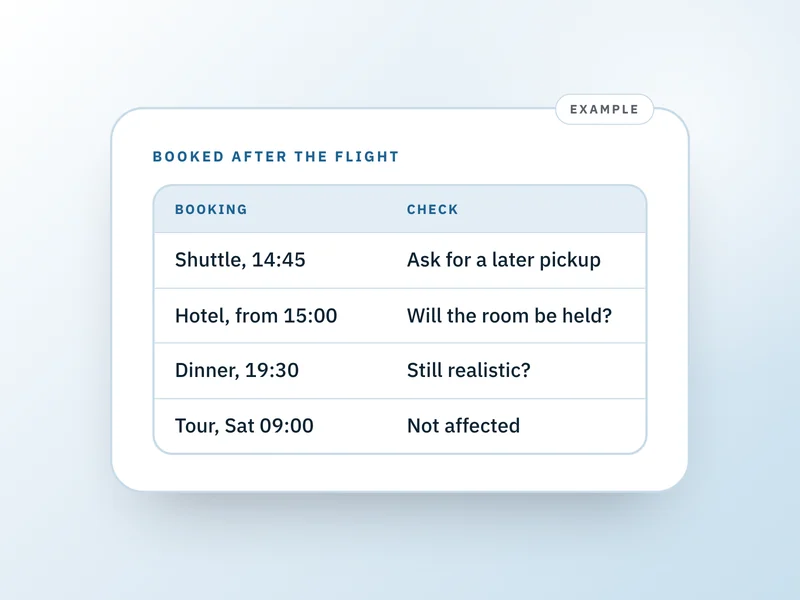
- 5When something moves, record the change. It walks down what depends on it and shows every affected booking as potentially affected, never edited for you, so you decide what actually needs doing.
- 6For each one, the Companion walks you through it: nine authored situations covering booking, flight, hotel and transport problems, something lost or stolen, plus the general ones for reorganising and letting people know.
- 7Name a destination and it works out that place's real timezone from a small offline table, so today means today where you are. Unrecognised places are said to be undetected rather than guessed at, and you can set one by hand from the same table.
- 8Waiting to hear back becomes a real open thread, shown on Today until it is resolved, then filed into the record with the line it closed on.
- 9Mark a trip done when it's over. It moves to Travel history, still readable and printable, where you can add a note and a link for what you want to remember.
- 10Print My Trip Book whenever you want a paper copy, blank and structured, as long or short as your trip needs. Once a trip is done, print its trip record instead: the same shape, already filled in with what you actually recorded.
Already have everything in your email and a notes app?
Most people do, and it works right up until something moves. Email holds each booking on its own, with no idea the transfer was booked around the flight. This holds the connection, so when one changes you are shown what was built on top of it instead of reconstructing it at a gate.
Can I plan more than one trip, or is it stuck on the first one?
As many as you want, one after another. Today, Trip and People always show the one trip currently in progress; mark it done when it's over and it moves to Travel history, still readable and printable, and you start the next one fresh.
Is this another itinerary planner?
A planner is about deciding what your trip will be. This is about running the trip once it exists and starts changing. It never suggests a destination, never fills a day for you, has no opinion about your itinerary, and every blank stays blank until you write in it.
Can I store my passport or my tickets in it?
No, and that is deliberate rather than a gap waiting to be filled. It cannot store a file at all: there is no upload anywhere in it. It records that a document exists, whose it is, and where it is kept, a photo on your phone or printed in the front pocket, which is what you actually need when somebody asks where it is.
Does it track flight status or tell me my flight is delayed?
No. It has no connection to any airline or booking system, and it sends no notifications of any kind. Everything it shows is something you recorded. What it does is more useful once you already know: tell you what else that delay touches.
What actually happens when a flight moves?
You record the new time on that booking. It walks down everything you said was booked around it, the transfer, the check-in, the reservation that evening, and shows each as potentially affected with its current time. It changes nothing for you. You go through them one at a time, with the Companion on any that need a phone call.
Does it get time zones right when I cross one?
It works the place's real timezone out from what you named it, using a small offline table of major cities and airports, so what counts as today is today where you are and daylight saving cannot quietly shift it. An unrecognised place says so rather than guessing, and you can set one by hand. There is no raw UTC offset anywhere, because an offset goes wrong twice a year.
Can it split costs between the people I am travelling with?
No. There is no amount, currency or balance column anywhere in it, on purpose. A thread can say somebody still owes their share in your own words, but nothing here calculates it. Adding that would make this a worse version of a product we already sell.
What happens when my phone dies?
My Trip Book is included: a blank, structured planner you print and fill in by hand, covering the trip overview, destinations, travellers, bookings, transport, accommodation, documents, open threads and daily pages, plus the connection and change-impact pages that are this product's own way of thinking. It is modular, so three destinations print three destination pages. Paper needs no signal, battery or login.
Is this a one-time purchase, and do I need an account?
One time, and yes. The account is what keeps your trip private and there on your phone at the airport after you set it up on a laptop.
Do I need to know my exact dates to set up a trip?
No. Only a name is required. Dates are a rough guess you can leave blank, and for a trip abroad you can add your visa's expiry to fill in a placeholder return date until you have a real flight booked.
What happens to my data?
Your trip is private to your account. Draftpace does not sell your data or use it for advertising, and nothing here is read by an AI model: there is no model provider anywhere in this product. It stores no files at all, which means no passport scan, no visa PDF, and no boarding pass image can be uploaded to it even by accident. It holds no amount, currency, or balance, so it never becomes a record of what a trip cost. Suggested wording for a difficult call stays in your browser and is never saved, even after you use it.
What's your refund policy?
Travel Companion is a digital product delivered the moment your payment clears, so there are no refunds once access is granted. If something is not working, is not what you understood it to be, or you were charged in error, write to us and we will put it right.
Contact support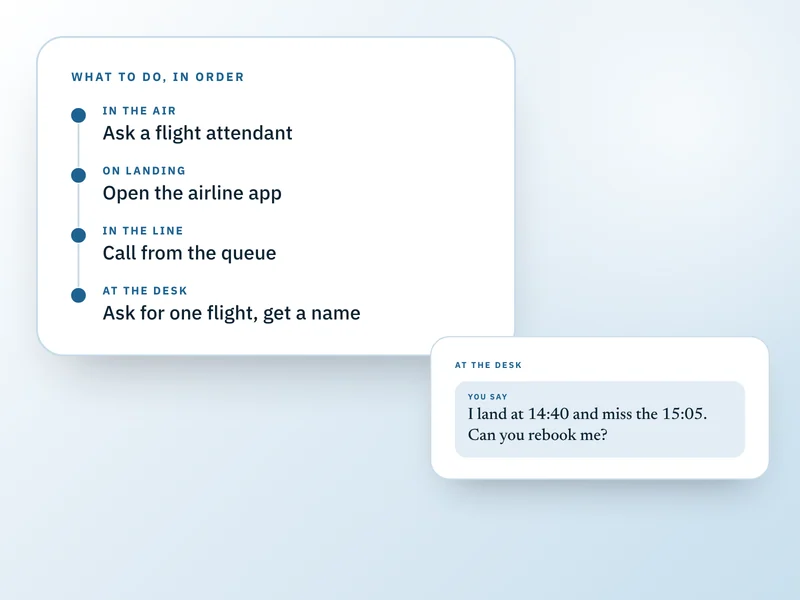
Buy it once. Keep it for good.
No subscription, no renewal, no upsell later. One payment and Travel Companion is yours, on every device you sign in on.
51% off $69. Digital product, no refunds once access is granted.