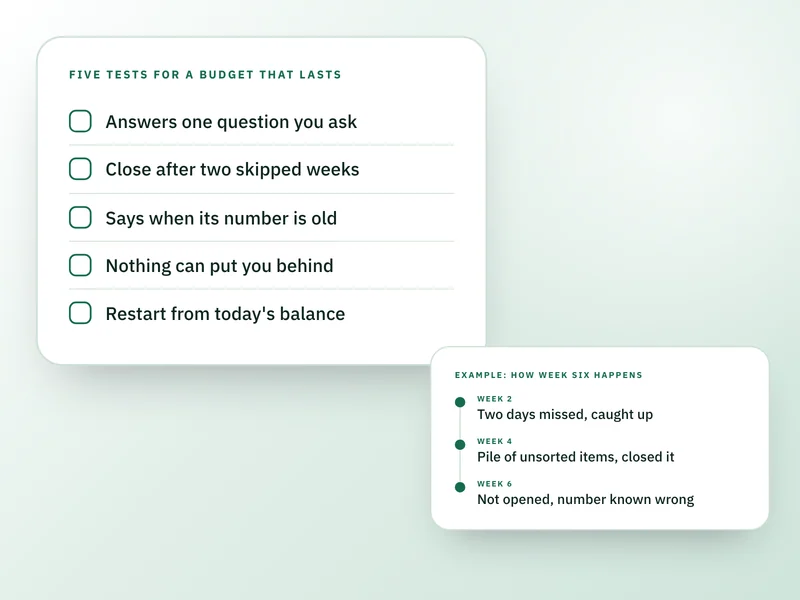
Budgets usually stop working because keeping them right takes more upkeep than a busy week allows. Miss a few days, the numbers drift, you stop trusting them, and you stop opening the app. A budget that lasts needs little upkeep, says when it's out of date, and still helps the week you ignore it.
This is for anyone who has started and dropped a budgeting app or spreadsheet and wants to know why before trying again. It can't tell you whether your income covers your costs, which no tool fixes. It isn't financial advice.
What week six looks like
Say you set up an app on the 1st. You build 14 categories, each with a limit, and for two weeks every purchase goes in as it happens. In week three you miss six days. You open the app and find 41 transactions waiting to be sorted, and a dining category showing $86 left that you know is wrong, because two dinners aren't in yet.
Sorting them would take 25 minutes you don't have, so you close it. This is an illustration, not a report of anyone's month, but the shape is a familiar one: the app was never wrong on purpose, and you didn't stop caring. The number just stopped being true, and nothing told you.
How the drift plays out
The same illustration, week by week.
1
- What you do
- Enter every purchase the day it happens
- What the app shows
- A true picture
2
- What you do
- Miss two days, catch up on Sunday
- What the app shows
- A true picture again
3
- What you do
- Miss six days
- What the app shows
- Wrong, and you can't say by how much
4
- What you do
- Open it, see the pile, close it
- What the app shows
- Still wrong
6
- What you do
- Don't open it
- What the app shows
- Wrong, and you know it
8
- What you do
- A renewal charge lands and you can't say what's left
- What the app shows
- Deleted, or ignored for good
| Week | What you do | What the app shows |
|---|---|---|
| 1 | Enter every purchase the day it happens | A true picture |
| 2 | Miss two days, catch up on Sunday | A true picture again |
| 3 | Miss six days | Wrong, and you can't say by how much |
| 4 | Open it, see the pile, close it | Still wrong |
| 6 | Don't open it | Wrong, and you know it |
| 8 | A renewal charge lands and you can't say what's left | Deleted, or ignored for good |
Why a wrong number is worse than no number
A figure built on gaps looks as sure of itself as one built on complete data. The first time you catch it being wrong, you discount all of it, including the parts that were right. After that, checking it costs effort and gives you nothing you'll believe.
The CFPB's research on managing spending found that consumers who have a budget generally don't compare their spending against it frequently or regularly. The drift above is the usual case, not the exception, so it's worth choosing a method that expects it.
What a tool can ask of you, and what it costs in a bad week
Sort every transaction into a category
- In a bad week
- The pile grows and the totals go wrong
- A lighter version
- Type in a few numbers you can check against your bank
Keep a limit for each category
- In a bad week
- One surprise cost breaks several at once
- A lighter version
- Watch one figure for the whole month
Keep the data complete
- In a bad week
- A gap makes every total suspect
- A lighter version
- Show how old the figure is
Show progress with counters and badges
- In a bad week
- Falling behind feels like a verdict
- A lighter version
- Show only what changed
| The tool asks you to | In a bad week | A lighter version |
|---|---|---|
| Sort every transaction into a category | The pile grows and the totals go wrong | Type in a few numbers you can check against your bank |
| Keep a limit for each category | One surprise cost breaks several at once | Watch one figure for the whole month |
| Keep the data complete | A gap makes every total suspect | Show how old the figure is |
| Show progress with counters and badges | Falling behind feels like a verdict | Show only what changed |
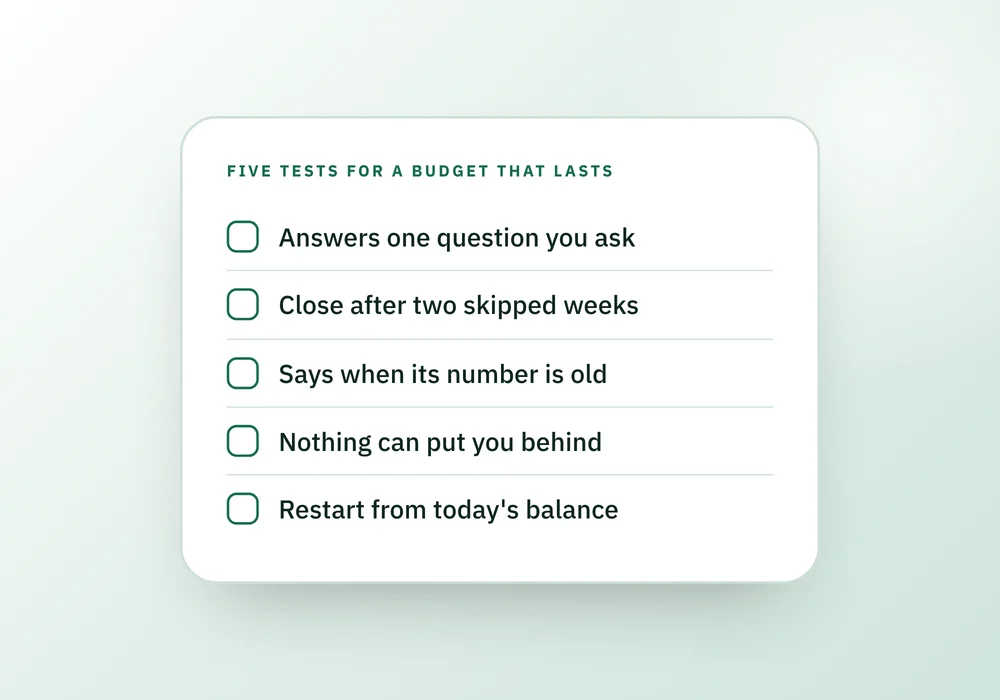
Five tests before you spend a weekend on setup
Tick the ones your tool really does. Each one you can't tick is a place where week six goes wrong.
5 things to do
Ticks are for this visit only. Nothing here is saved anywhere.
The upkeep small enough to keep
Every method has some upkeep. The aim is a weekly amount you can do on a bad week.
- Pick one weekday and put it in your calendar today. A fixed day means it happens without a decision.
- Ask four questions: has income come in or changed, has a bill changed or been paid, is there spending you haven't added, does your savings or cushion need adjusting. Update only the lines where the answer is yes. How to budget for beginners has the full five minute version.
- If you fall behind, don't rebuild the gap. Restart from today's balance and go forward.
- Once a month, spend ten minutes on an end of month review and change the lines that were wrong.
When the tool isn't the reason
Sometimes a budget stops working for a cause no app can fix. Check these before you switch again.
- The number is negative most months. That's an income gap, and the first place to look is how to save money fast and your fixed bills, not the app.
- Your pay swings. A budget built on an average is wrong half the time, and budgeting with irregular income starts from your lowest months instead.
- Your bills change every month. Budgeting for variable bills sets a planning figure so a high month doesn't break the plan.
- A fixed split, such as the 50/30/20 rule, doesn't fit your rent. The percentages weren't made from your month.
- Someone else shares the money and isn't part of it. A budget one person keeps and the other ignores breaks on the first shared purchase, and splitting bills with a partner or roommate covers writing the agreement down.
Questions people ask
Why do I keep quitting budgeting apps?
Usually because the upkeep outgrows the reward. Categorizing every purchase is a chore with no visible payoff, and one missed week makes the totals wrong. Once you catch the app being wrong, you stop trusting it. Pick a method that stays roughly right when you skip a week.
Is it normal to stop budgeting after a couple of months?
It's common enough that the CFPB's research on managing spending found that people with a budget generally don't check their spending against it often or regularly. Treat it as a design problem rather than a personal failing, and choose a smaller method: fewer lines, one weekly check, and a restart that doesn't need catching up.
Do I need to track every transaction to budget?
No. A first budget needs your last few statements to set the numbers, then a weekly look at the few lines that move. Logging every purchase is the part that's easiest to drop. A short weekly check does most of the same work, and it's a routine you can do when you're tired.
How do I start budgeting again after months off?
Don't rebuild the missing months. Write down today's balance, the bills due before your next payday, and what you're holding back, then work forward from there. The gap in your records doesn't change what's in the account today, and today's number is the only one you need to make the next decision.
Is a spreadsheet better than a budgeting app?
Neither is better by itself. The test is what happens when you skip two weeks. A spreadsheet only knows what you remembered to update, and so does an app you type into. Choose whichever one you can put right in five minutes after a bad week, and that tells you when its figure is out of date.
Where the Companions fit
Monthly Money Reset is free and built around the tests above. It answers one question, what's safe to spend this month, and shows every line of the sum. It adds a "May be out of date" note after seven days without an update, and it has no day counters or behind state. It isn't upkeep-free: you type your numbers in, because it doesn't connect to your bank, and a four question weekly check-in walks you through what changed.
If your money sits across several accounts, bills, subscriptions and debts, Personal Finance Companion keeps them together and shows how each figure is worked out. It marks Available Money as Preliminary while a bill has no due date, and one next move at a time replaces a wall of tasks. That figure is a month-level estimate, not an until-payday number.
Sources and how we checked
- Consumer insights on managing spending (CFPB): Backs the statement that consumers with a budget generally do not benchmark their spending against it frequently or regularly.Checked 26 September 2026.
- Budgeting: How to create a budget and stick with it (CFPB blog): Backs starting realistic, one month at a time, with a tracking method that suits you, and updating the budget when circumstances change.Checked 26 September 2026.
Where to go next
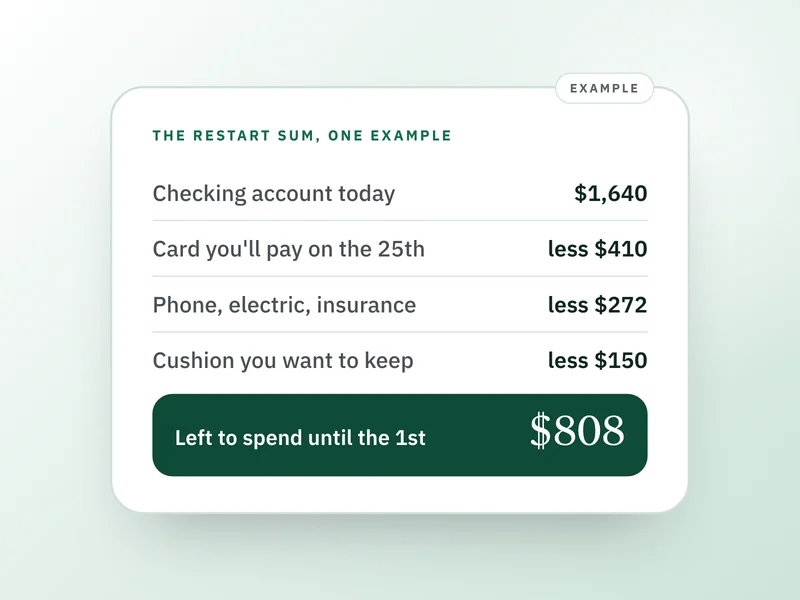 If this is where you areYou fell off your budget: how to restart this monthAlready stopped keeping up with yours? Restart with today's balance and one clear number instead of catching up.
- How to make a monthly budget for the first time
Build a first budget from four things and a five minute weekly check that keeps it in use.
- End of month money review: a ten minute checklist
A short monthly review is how a budget stays in use without turning into a chore.
- The 50/30/20 rule: who it fits and where it breaks
A fixed split can be the reason a budget fails, so test it against your own month here.